

/settings.
Settings is organised into seven tabs:
| Tab | Scope | What it controls |
|---|---|---|
| Account | You | Name, email, avatar, password |
| Companies | Org | Team members, invitations, roles (admin only for changes) |
| Profile | You | Role, sectors covered, response language |
| Memory | You | What cf0 remembers about your preferences and prior threads |
| Skills | You + Org | Your personal Skills (and org Skills if you’re admin) |
| Brand | Org | Logo, colours, font for branded PDF reports (admin only) |
| Integrations | Org | Third-party connectors — Microsoft 365, Google Workspace, Slack, Notion, Granola |
Account
Personal details on your own user record:- Name — display name visible to teammates
- Email — login address (changes require email verification)
- Profile picture — your avatar across the app
- Password — change your password
Companies (team management)
The Companies tab manages your organisation’s team — members, roles, and invitations. It is not a stock watchlist or filing search — to find a company’s filings, use Filings.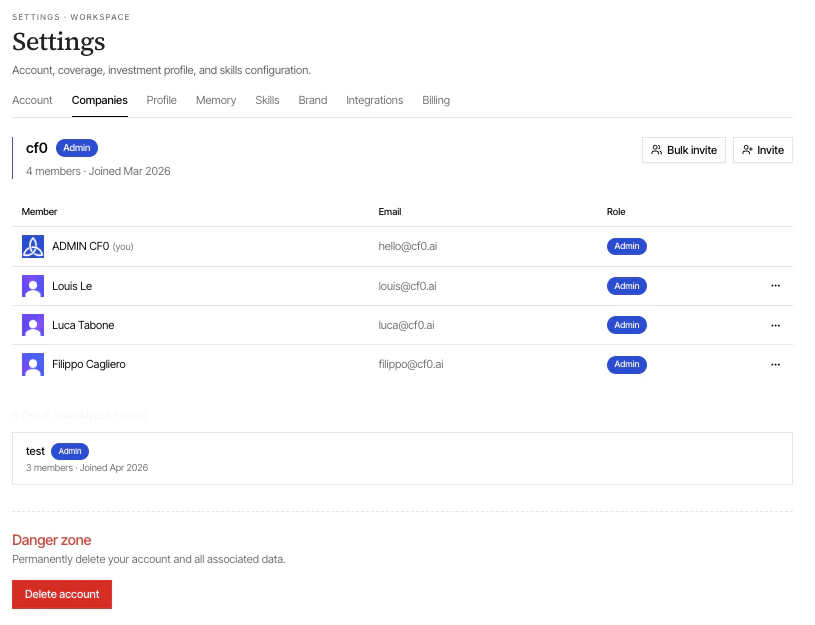
Invite a teammate
Click Invite, enter their email, and choose a role:
- Member — full feature access within the org
- Admin — can also manage members, brand, and integrations
Profile
Tells cf0 what you cover and how you want answers framed.- Role — Analyst, Portfolio manager, Research operations, Other
- Sectors — Technology, Healthcare, Financials, Energy, Consumer Discretionary, Consumer Staples, Industrials, Real Estate, Materials
- Language — English, Portuguese, Spanish, French, German, Chinese. Every Lab response and report is written in this language
Your profile is private to you. It’s not shared with other org members.
Memory
What cf0 remembers about you across sessions — your stated preferences, recurring queries, prior thread context. Review and clear individual entries when needed.Skills
Personal Skills you’ve created (private to you). Enable, disable, edit, or delete from here. Org Skills (shared by an admin) are visible but read-only unless you’re an admin yourself. To create new Skills, use the dedicated Skills page, not this tab.Brand (org admin only)
Controls the look of branded PDF reports — logo, colour scheme, font choices. Every Report your team exports inherits these settings without manual formatting. Recommended uploads:- Logo — SVG preferred, PNG acceptable; light + dark variants for theme adaptation
- Primary colour — your firm’s accent (used scarcely on covers and section heads)
- Typeface — defaults to the cf0 editorial stack; override if your firm has a brand font
Integrations (org admin only)
Connect cf0 to third-party tools your firm already uses. See the Integrations page for the full catalogue and connection flow.Danger zone
At the bottom of the Settings page, Delete account permanently removes your user profile, query history, and personal data. Organisation data and shared documents are not affected.Account deletion cannot be undone. To leave an organisation without deleting your account, ask your org admin to remove your membership instead.