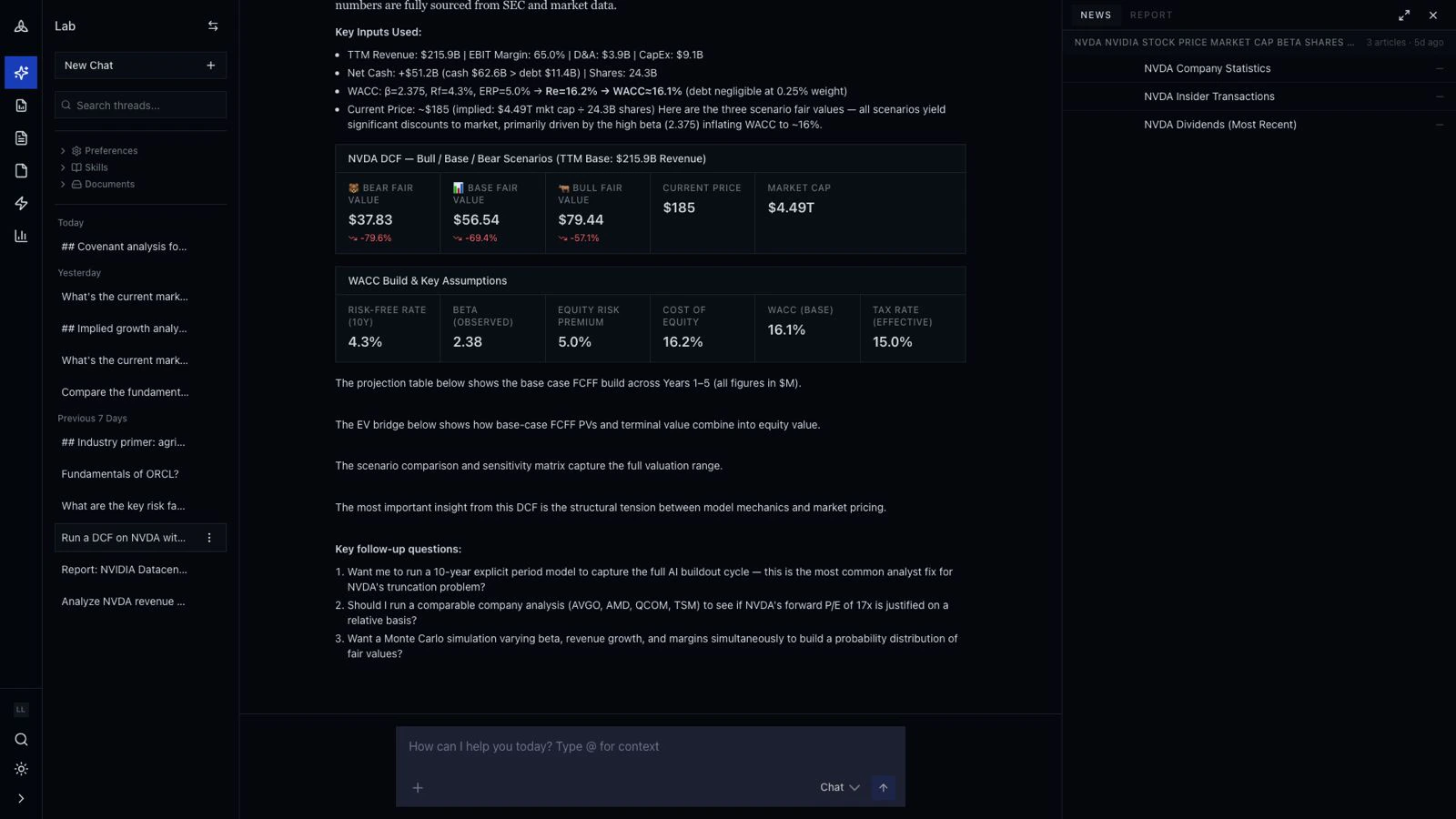
A standard analyst task: “Build a DCF on NVDA. Use the last five years of 10-Ks for the historical, current consensus for forward revenue, and a 10% / 7% / 4% three-stage growth schedule. WACC from market data. Show Bear / Base / Bull fair value.”
In Excel that’s a half-day with manual data pulls. In cf0 it’s three prompts.
Step 1 — open Lab and ask
Open Lab from the left sidebar. Either type the question in plain English, or invoke the system Skill directly:
The Skill runs but cf0 doesn’t just ship a number — it pauses on the assumptions that change the answer the most.
Step 2 — review the clarifying gates
For a DCF, the inputs that swing fair value most are WACC, terminal growth, and forward revenue growth. cf0 builds defaults from market data and consensus, then asks before committing:
- WACC — built from current risk-free rate, equity risk premium, and the company’s beta (with the build shown alongside).
- Forward revenue growth — three-stage default with the option to override per stage.
- Terminal multiple — sector median by default; override if your thesis differs.
The model pauses at this point. Accept the defaults to keep going, or override and re-run. The output isn’t generated until you’ve signed off on the inputs.
Step 3 — read the fair-value range
Once the assumptions are committed, Lab streams three cards: Bear, Base, Bull. Each shows the implied fair value, the upside / downside to current market price, and the assumption it’s most sensitive to.
Below the cards: the WACC build & assumptions card (auditable), the revenue projection table with QoQ and YoY deltas, and a sensitivity matrix of fair value across WACC × terminal-growth pairs.
Every number cites the underlying filing or data feed. Click any figure to open the source.
In the same thread:
Generate a one-page DCF brief for the PM. Lead with the Bull / Base / Bear range, include the WACC build, the assumptions table, and the sensitivity matrix. Flag the two assumptions the answer is most sensitive to.
cf0 reads the conversation and drafts the report. Edit any section inline before exporting the PDF. The charts and tables aren’t editable — they reflect the live thread data — but the prose is. See Reports for the full editor.
Step 5 — save the workflow as a Skill
If “run a DCF with our firm’s WACC build and ship a one-pager” is recurring, save it as a custom Skill from the Skills page. Org admins can share it across the team. Future runs invoke with /firm-dcf AAPL — same WACC build, same three-stage schedule, same one-pager template.
What this used
This example used every part of cf0:
- SEC + global filings — NVDA 10-Ks, consensus revenue, current market data feed.
- Lab — the surface where the question came in, the WACC build that rendered live, the report draft.
- Reports — branded PDF assembly from the Lab thread.
- Skills — saved the firm’s specific WACC and three-stage schedule for the next run.
Citations trace every number to source. Reports go out in your firm’s brand template.
Next walkthrough
→ Build an IC memo Last modified on May 25, 2026