> ## Documentation Index
> Fetch the complete documentation index at: https://docs.cf0.ai/llms.txt
> Use this file to discover all available pages before exploring further.
# Skills
> Skills are reusable prompt templates for recurring research workflows. Invoke any Skill in Lab with a slash command to run your firm's workflows instantly.
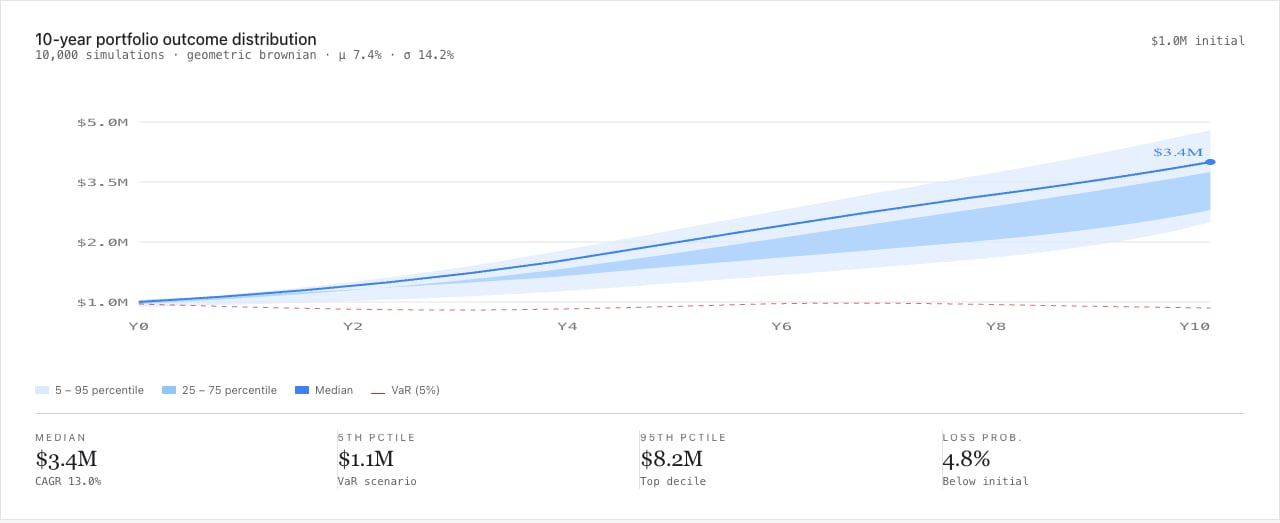
Skills are reusable prompt workflows that you invoke in [Lab](/features/lab) with a single slash command. Save the instructions once, call it with `/skill-name` whenever you need it. cf0 ships with a catalogue of named system workflows covering the institutional research stack — DCF, LBO, comps, IC memos, earnings recaps, debt covenant reviews, monte carlo, sector scans — and you can encode any process your firm runs as a personal or org-wide Skill.
```mermaid theme={null}
%%{init: {"theme": "base", "themeVariables": {"primaryColor": "#1d4ed8", "primaryTextColor": "#ffffff", "primaryBorderColor": "#172554", "secondaryColor": "#ffffff", "tertiaryColor": "#fafafa", "lineColor": "#52525b", "textColor": "#18181b", "mainBkg": "#1d4ed8", "secondBkg": "#ffffff", "clusterBkg": "transparent", "clusterBorder": "#e4e4e7", "edgeLabelBackground": "#ffffff", "labelTextColor": "#18181b", "actorBkg": "#1d4ed8", "actorBorder": "#172554", "actorTextColor": "#ffffff", "actorLineColor": "#52525b", "signalColor": "#52525b", "signalTextColor": "#18181b", "labelBoxBkgColor": "#1d4ed8", "labelBoxBorderColor": "#172554", "noteBkgColor": "#fafafa", "noteTextColor": "#18181b", "noteBorderColor": "#e4e4e7", "messageTextColor": "#18181b", "sequenceNumberColor": "#ffffff", "fontFamily": "Inter Tight, -apple-system, sans-serif", "fontSize": "13px"}}}%%
graph LR
U["Type /
in Lab"] --> P["Skills palette
System · Org · Mine"]
P --> I["Invoke
/dcf NVDA"]
I --> R["Run with
your variables"]
R --> O["Streaming output
chart · table · memo"]
O --> S["Optional → Save
as new Skill"]
classDef io fill:#ffffff,stroke:#d4d4d8,color:#18181b
classDef step fill:#1d4ed8,stroke:#172554,color:#ffffff
class U,O,S io
class P,I,R step
```
 ## System Skills vs custom Skills
A growing library of pre-built workflows covering the standard institutional research stack — DCF, LBO, comps tables, earnings recaps, debt covenant review, IC memos, sector scans, monte carlo. Available to every user immediately, no setup required.
Skills you create yourself, tailored to your firm's exact processes. Personal Skills are private to you; org-wide Skills (created by org admins) are shared with every team member.
## Invoke a Skill in Lab
Type `/` followed by the Skill name in the Lab chat input and press **Enter**.
```
/earnings-summary
```
Lab loads the Skill's prompt template, applies any variable substitutions, and starts the workflow. You can add context after the slash command to fill in template variables — for example, `/earnings-summary AAPL Q3 2024`.
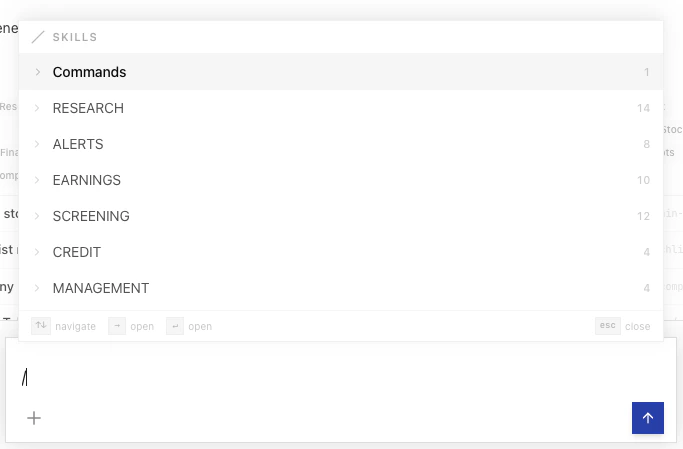
Type `/` in Lab to see a list of all available Skills filtered as you type. Scroll through system Skills and your custom Skills in one place.
## Create a custom Skill
The slug used for `/skill-name` invocation is generated from the display name.
Plain instructions, structured-output requests, and `{{variable}}` placeholders all work. Or describe the workflow in English and click **Generate with AI** — cf0 drafts the prompt for you to edit.
Your Skill appears under **Mine** and is immediately available in Lab.
## Edit or delete a Skill
Select any custom Skill from the Skills list to open it in the detail panel. Click **Edit** to modify the name, description, or prompt content. Click **Delete** to remove it permanently.
You can only edit or delete Skills you own. System Skills and org Skills (if you are not an org admin) are read-only.
## Org-wide Skills (org admins)
Org admins can create Skills that are shared automatically with every member of the organisation.
Follow the same steps as creating a personal Skill, but toggle **Share with org** before saving.
The Skill is saved under **Org** scope and appears in the Skills list for all team members immediately.
Org Skills appear under the **Org** filter in the Skills library. Team members can invoke them with `/skill-name` in Lab but cannot edit or delete them.
## Find Skills
Use the search bar and filter tabs at the top of the Skills library to find what you need:
| Filter | Shows |
| ---------- | ---------------------------------- |
| **All** | Every Skill available to you |
| **System** | cf0's pre-built workflow catalogue |
| **Org** | Skills created by your org admin |
| **Mine** | Skills you have created |
## System Skills vs custom Skills
A growing library of pre-built workflows covering the standard institutional research stack — DCF, LBO, comps tables, earnings recaps, debt covenant review, IC memos, sector scans, monte carlo. Available to every user immediately, no setup required.
Skills you create yourself, tailored to your firm's exact processes. Personal Skills are private to you; org-wide Skills (created by org admins) are shared with every team member.
## Invoke a Skill in Lab
Type `/` followed by the Skill name in the Lab chat input and press **Enter**.
```
/earnings-summary
```
Lab loads the Skill's prompt template, applies any variable substitutions, and starts the workflow. You can add context after the slash command to fill in template variables — for example, `/earnings-summary AAPL Q3 2024`.
Type `/` in Lab to see a list of all available Skills filtered as you type. Scroll through system Skills and your custom Skills in one place.
## Create a custom Skill
The slug used for `/skill-name` invocation is generated from the display name.
Plain instructions, structured-output requests, and `{{variable}}` placeholders all work. Or describe the workflow in English and click **Generate with AI** — cf0 drafts the prompt for you to edit.
Your Skill appears under **Mine** and is immediately available in Lab.
## Edit or delete a Skill
Select any custom Skill from the Skills list to open it in the detail panel. Click **Edit** to modify the name, description, or prompt content. Click **Delete** to remove it permanently.
You can only edit or delete Skills you own. System Skills and org Skills (if you are not an org admin) are read-only.
## Org-wide Skills (org admins)
Org admins can create Skills that are shared automatically with every member of the organisation.
Follow the same steps as creating a personal Skill, but toggle **Share with org** before saving.
The Skill is saved under **Org** scope and appears in the Skills list for all team members immediately.
Org Skills appear under the **Org** filter in the Skills library. Team members can invoke them with `/skill-name` in Lab but cannot edit or delete them.
## Find Skills
Use the search bar and filter tabs at the top of the Skills library to find what you need:
| Filter | Shows |
| ---------- | ---------------------------------- |
| **All** | Every Skill available to you |
| **System** | cf0's pre-built workflow catalogue |
| **Org** | Skills created by your org admin |
| **Mine** | Skills you have created |