> ## Documentation Index
> Fetch the complete documentation index at: https://docs.cf0.ai/llms.txt
> Use this file to discover all available pages before exploring further.
# Lab
> Lab is where you ask. Plain English in, streaming charts and tables and cited paragraphs out. Every figure traces back to source data.
Lab is where the research happens — the surface an analyst goes to when there's a question. Type it in English, get back structured analysis: chart, table, narrative, with citations on every number. No template to fill, no dashboard to build, no formula to write. Lab picks the UI the answer needs and renders it inline.
```mermaid theme={null}
%%{init: {"theme": "base", "themeVariables": {"primaryColor": "#1d4ed8", "primaryTextColor": "#ffffff", "primaryBorderColor": "#172554", "secondaryColor": "#ffffff", "tertiaryColor": "#fafafa", "lineColor": "#52525b", "textColor": "#18181b", "mainBkg": "#1d4ed8", "secondBkg": "#ffffff", "clusterBkg": "transparent", "clusterBorder": "#e4e4e7", "edgeLabelBackground": "#ffffff", "labelTextColor": "#18181b", "actorBkg": "#1d4ed8", "actorBorder": "#172554", "actorTextColor": "#ffffff", "actorLineColor": "#52525b", "signalColor": "#52525b", "signalTextColor": "#18181b", "labelBoxBkgColor": "#1d4ed8", "labelBoxBorderColor": "#172554", "noteBkgColor": "#fafafa", "noteTextColor": "#18181b", "noteBorderColor": "#e4e4e7", "messageTextColor": "#18181b", "sequenceNumberColor": "#ffffff", "fontFamily": "Inter Tight, -apple-system, sans-serif", "fontSize": "13px"}}}%%
graph LR
Q["Question
plain English"] --> P["Lab parses
+ plans"]
P --> D[("SEC + global filings
+ docs
+ integrations")]
D --> A["Streaming answer
chart · table · prose"]
A --> C["Citations
on every figure"]
A --> R["One click → PDF
(Reports)"]
classDef io fill:#ffffff,stroke:#d4d4d8,color:#18181b
classDef step fill:#1d4ed8,stroke:#172554,color:#ffffff
classDef store fill:#fafafa,stroke:#d4d4d8,color:#18181b
class Q,A,C,R io
class P step
class D store
```
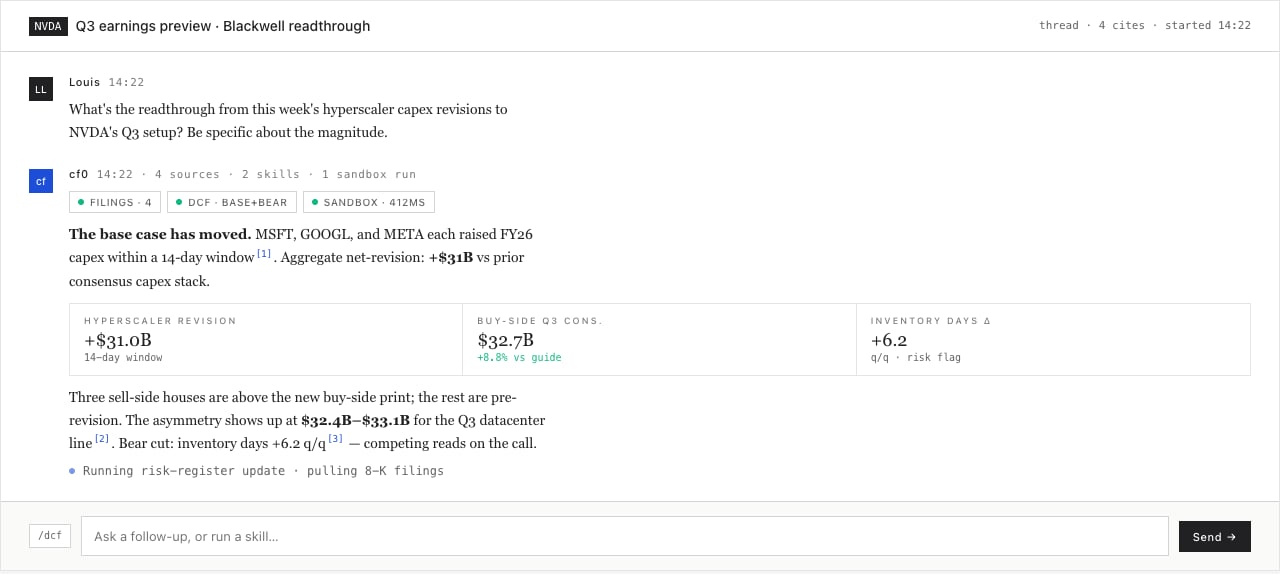
 > *"Compare AAPL and MSFT free cash flow margins over the last 5 years and flag any quarter where the gap inverted."*
That's a full Lab prompt. The thread streams a margin time-series chart, a side-by-side table with `tnum`-aligned digits, a paragraph identifying the inversion quarters, and citations linking each margin number to the underlying 10-K or 10-Q. End-to-end: under a minute.
## What ships in a response
> *"Compare AAPL and MSFT free cash flow margins over the last 5 years and flag any quarter where the gap inverted."*
That's a full Lab prompt. The thread streams a margin time-series chart, a side-by-side table with `tnum`-aligned digits, a paragraph identifying the inversion quarters, and citations linking each margin number to the underlying 10-K or 10-Q. End-to-end: under a minute.
## What ships in a response
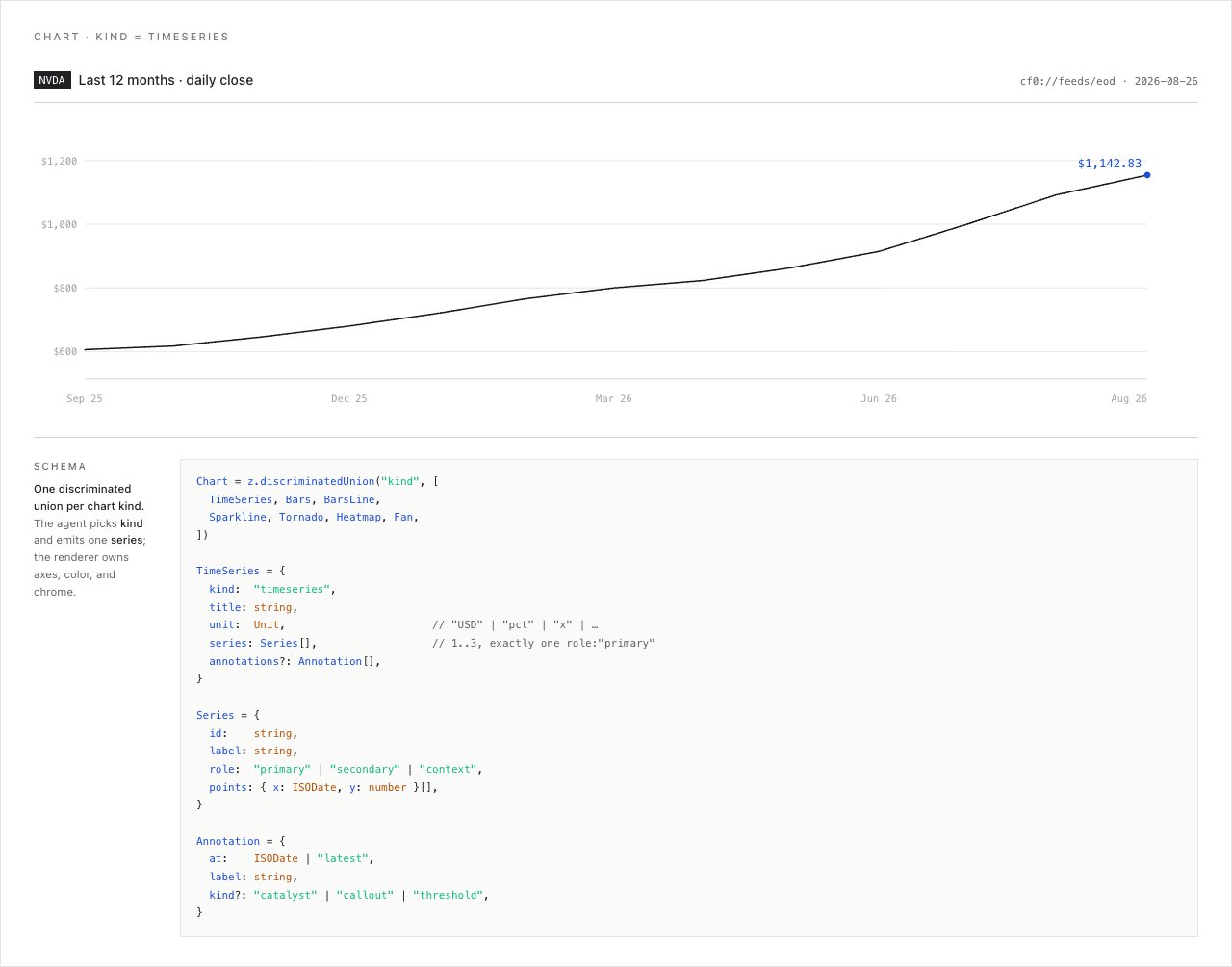 Charts, tables, metric tiles, timelines — whichever component matches the question. Real interactive components, not screenshots; hover, sort, drill in.
Every figure anchors to a source — the exact filing, page, and section. Click to open the underlying document.
Each session lives in its own thread. Come back tomorrow, the context is intact.
Type `/` to invoke any Skill — your firm's reusable research moves bound to a slug. See [Skills](/features/skills).
## Threads
Each Lab session is a thread. Threads persist across sessions and live under your user account.
* **New thread** — top of the sidebar
* **Switch thread** — click any thread in the sidebar list
* **Rename thread** — click the thread title and type
Thread content is private to your user. Org admins see aggregate activity counts on the [Dashboard](/workspace/dashboard), never message bodies.
## Citations
Every quantitative claim Lab makes links to a source — company, filing type (10-K, 10-Q, 8-K, transcript), filing date, and the specific section or table. For narrative claims, Lab reads the raw text and quotes verbatim where precision matters.
See [Citations and audit trail](/security/citations-and-audit) for how source-of-truth is generated and exported.
## Skills
Repeating workflows — DCF, comps, IC memos, earnings recaps, debt covenant checks — become **Skills**. Save the prompt once, invoke with `/skill-name` from any thread.
Type `/` in Lab to see all available Skills filtered live. cf0 ships with a catalogue of named system workflows — DCF, LBO, comps, IC memos, earnings recaps, monte carlo — and your org admin can encode any process your team runs. See [Skills](/features/skills).
Charts, tables, metric tiles, timelines — whichever component matches the question. Real interactive components, not screenshots; hover, sort, drill in.
Every figure anchors to a source — the exact filing, page, and section. Click to open the underlying document.
Each session lives in its own thread. Come back tomorrow, the context is intact.
Type `/` to invoke any Skill — your firm's reusable research moves bound to a slug. See [Skills](/features/skills).
## Threads
Each Lab session is a thread. Threads persist across sessions and live under your user account.
* **New thread** — top of the sidebar
* **Switch thread** — click any thread in the sidebar list
* **Rename thread** — click the thread title and type
Thread content is private to your user. Org admins see aggregate activity counts on the [Dashboard](/workspace/dashboard), never message bodies.
## Citations
Every quantitative claim Lab makes links to a source — company, filing type (10-K, 10-Q, 8-K, transcript), filing date, and the specific section or table. For narrative claims, Lab reads the raw text and quotes verbatim where precision matters.
See [Citations and audit trail](/security/citations-and-audit) for how source-of-truth is generated and exported.
## Skills
Repeating workflows — DCF, comps, IC memos, earnings recaps, debt covenant checks — become **Skills**. Save the prompt once, invoke with `/skill-name` from any thread.
Type `/` in Lab to see all available Skills filtered live. cf0 ships with a catalogue of named system workflows — DCF, LBO, comps, IC memos, earnings recaps, monte carlo — and your org admin can encode any process your team runs. See [Skills](/features/skills).