> ## Documentation Index
> Fetch the complete documentation index at: https://docs.cf0.ai/llms.txt
> Use this file to discover all available pages before exploring further.
# Browse SEC and global regulatory filings
> Browse and search SEC and global regulatory filings in cf0 — EDGAR with structured extraction, plus directory coverage across nine international regulators.
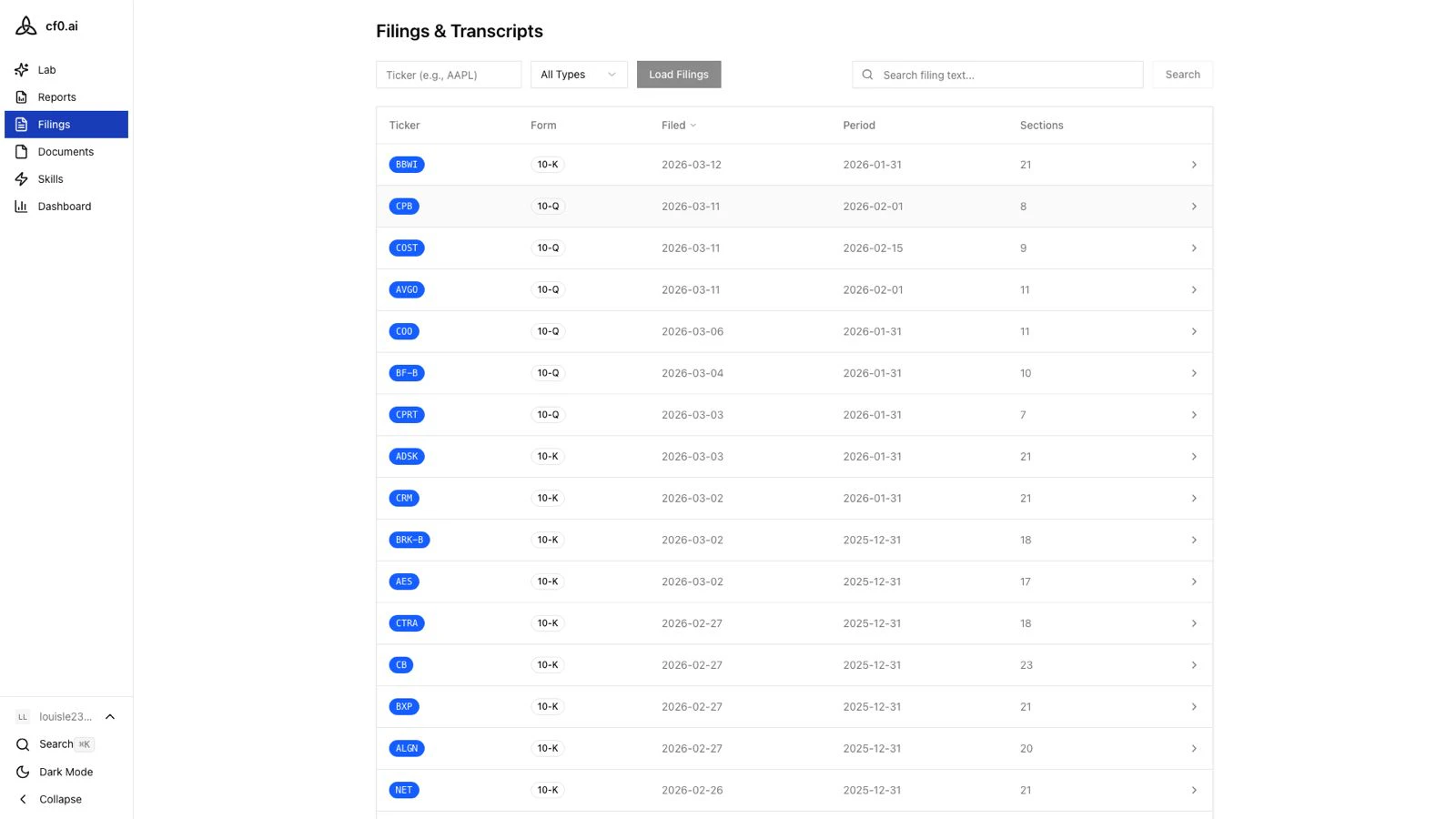
Filings is the directory layer over cf0's regulatory archive. Search by name or ticker, browse by market, open a specific document, and read individual sections — all without leaving cf0. Data is read from cf0's proprietary ingestion pipeline (not fetched live from EDGAR per request), so search is fast and structured.
 ## Coverage
Full SEC EDGAR universe with structured extraction. Companies, filings, and sections are queryable through Lab as well as the Filings page.
Recent annual and quarterly filings, 8-Ks, prospectuses, and proxies are parsed and indexed on demand. New names get a same-session ingest from EDGAR.
Directory + filing-list coverage across the major global markets your team reaches into — US, JP, KR, GB, CA, IN, AU, HK, CN, BR — through adapters to each regulator's source.
Filings are parsed into sections (Item 1A, MD\&A, etc.) so Lab can quote the exact passage a figure or claim came from, not just the filing as a whole.
## Markets
The Filings landing page organises coverage into two tiers:
* **Filing ingestion available** — markets where cf0 has processed and indexed the full filing content, enabling section-level reading and full-text search. Brazil (BR) is the most recently added market.
* **Directory only** — markets where company and filing metadata is available for browsing, but full-text section search is not yet enabled.
Click any market in the grid to browse its companies.
## Find and read a filing
Open **Filings** from the sidebar. Type a name or ticker in the search bar, or click a market in the grid to browse — sorted by market cap by default.
Click any company to see its filing history. Each row shows the form type (10-K, 10-Q, 8-K, etc.), the filing date, and a link to the original document.
Click **Read** to open the section reader on the right. Jump to any section (Item 1A Risk Factors, Item 7 MD\&A) and use full-text search inside the filing.
Filing data is sourced from cf0's proprietary pipeline, not fetched live from EDGAR on demand. Data is updated regularly, but there may be a short delay between a company filing with the SEC and its appearance in cf0.
## Use filings in Lab
Any filing you find in Filings can be analysed directly in [Lab](/features/lab). Ask Lab to summarise a 10-K, extract key financial figures, or compare two annual reports — it draws on the same indexed filing content.
## Coverage
Full SEC EDGAR universe with structured extraction. Companies, filings, and sections are queryable through Lab as well as the Filings page.
Recent annual and quarterly filings, 8-Ks, prospectuses, and proxies are parsed and indexed on demand. New names get a same-session ingest from EDGAR.
Directory + filing-list coverage across the major global markets your team reaches into — US, JP, KR, GB, CA, IN, AU, HK, CN, BR — through adapters to each regulator's source.
Filings are parsed into sections (Item 1A, MD\&A, etc.) so Lab can quote the exact passage a figure or claim came from, not just the filing as a whole.
## Markets
The Filings landing page organises coverage into two tiers:
* **Filing ingestion available** — markets where cf0 has processed and indexed the full filing content, enabling section-level reading and full-text search. Brazil (BR) is the most recently added market.
* **Directory only** — markets where company and filing metadata is available for browsing, but full-text section search is not yet enabled.
Click any market in the grid to browse its companies.
## Find and read a filing
Open **Filings** from the sidebar. Type a name or ticker in the search bar, or click a market in the grid to browse — sorted by market cap by default.
Click any company to see its filing history. Each row shows the form type (10-K, 10-Q, 8-K, etc.), the filing date, and a link to the original document.
Click **Read** to open the section reader on the right. Jump to any section (Item 1A Risk Factors, Item 7 MD\&A) and use full-text search inside the filing.
Filing data is sourced from cf0's proprietary pipeline, not fetched live from EDGAR on demand. Data is updated regularly, but there may be a short delay between a company filing with the SEC and its appearance in cf0.
## Use filings in Lab
Any filing you find in Filings can be analysed directly in [Lab](/features/lab). Ask Lab to summarise a 10-K, extract key financial figures, or compare two annual reports — it draws on the same indexed filing content.