> ## Documentation Index
> Fetch the complete documentation index at: https://docs.cf0.ai/llms.txt
> Use this file to discover all available pages before exploring further.
# Head-to-head
> Compare two megacap names on free cash flow margin over five years and ship a one-pager to the PM. Real Lab thread, real Reports flow, no spreadsheets.
A common analyst task: *"Compare AAPL and MSFT free cash flow margins over the last five years and flag any quarter where the gap inverted. Then ship a one-pager to the PM."*
In a Bloomberg-and-Excel workflow that's a 45-minute job. In cf0 it's three prompts.
## Step 1 — open Lab and ask in plain English
Open **Lab** from the left sidebar. Type the question:
> *Compare AAPL and MSFT free cash flow margins over the last five years (FY2021–FY2025). Show me a quarter-by-quarter table, plot the margin time-series, and flag any quarter where MSFT's margin exceeded AAPL's.*
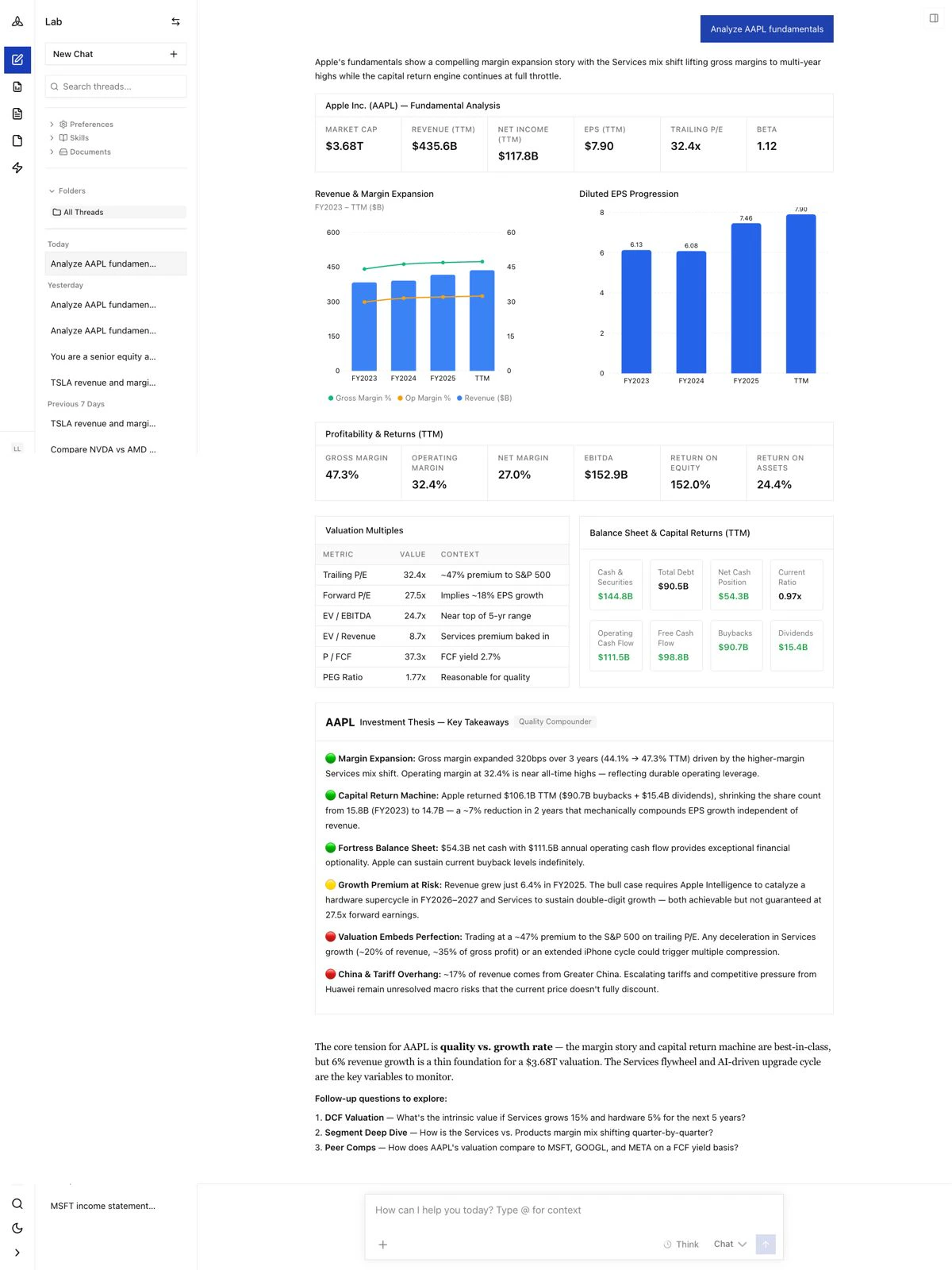 Lab parses the request, pulls the relevant 10-Ks and 10-Qs, calculates the FCF margins per quarter, and streams:
* A **table** with quarterly revenue, free cash flow, FCF margin, and the AAPL–MSFT spread for each quarter
* A **chart** showing both companies' margin trajectories over the five-year window
* A **narrative paragraph** identifying the specific quarters where MSFT crossed above AAPL, with a one-line explanation grounded in the underlying filings
* **Citations** on every figure — click any number to open the source 10-Q or 10-K page
## Step 2 — follow up to deepen the analysis
Lab keeps full thread context. Ask a follow-up by reference:
> *Pull the relevant 10-K paragraphs that explain the margin inversion in the quarter you just flagged.*
The agent goes back to the source filings, extracts the relevant management commentary (typically MD\&A), and quotes the passage verbatim — citation intact.
## Step 3 — generate a one-page PM brief
Once the thread is tight, ask Lab to ship a report:
> *Generate a one-page brief for the PM summarising the AAPL vs MSFT FCF margin comparison, the inversion quarter(s), and management commentary. Include the chart and the comparison table.*
Click **Generate report** in the thread toolbar (or just ask in chat). cf0 reads the conversation and drafts a branded PDF with:
* Cover page in your firm's brand template
* Investment summary
* The chart and table from the thread
* Inline citations
* Standard sections (thesis, risk flags, disclosure)
Lab parses the request, pulls the relevant 10-Ks and 10-Qs, calculates the FCF margins per quarter, and streams:
* A **table** with quarterly revenue, free cash flow, FCF margin, and the AAPL–MSFT spread for each quarter
* A **chart** showing both companies' margin trajectories over the five-year window
* A **narrative paragraph** identifying the specific quarters where MSFT crossed above AAPL, with a one-line explanation grounded in the underlying filings
* **Citations** on every figure — click any number to open the source 10-Q or 10-K page
## Step 2 — follow up to deepen the analysis
Lab keeps full thread context. Ask a follow-up by reference:
> *Pull the relevant 10-K paragraphs that explain the margin inversion in the quarter you just flagged.*
The agent goes back to the source filings, extracts the relevant management commentary (typically MD\&A), and quotes the passage verbatim — citation intact.
## Step 3 — generate a one-page PM brief
Once the thread is tight, ask Lab to ship a report:
> *Generate a one-page brief for the PM summarising the AAPL vs MSFT FCF margin comparison, the inversion quarter(s), and management commentary. Include the chart and the comparison table.*
Click **Generate report** in the thread toolbar (or just ask in chat). cf0 reads the conversation and drafts a branded PDF with:
* Cover page in your firm's brand template
* Investment summary
* The chart and table from the thread
* Inline citations
* Standard sections (thesis, risk flags, disclosure)
 Review the draft inline — click any section to edit text directly. Charts and tables pulled from the Lab thread aren't editable; they reflect the live data from your analysis. Click **Export PDF** when you're happy.
## Save it as a Skill
If "compare two names on a single metric and ship a one-pager" is a recurring move for your firm, save the workflow as a [Skill](/features/skills):
```
/save-skill --name compare-fcf-margins
```
Now anyone on the team can run the same workflow in one slash command:
```
/compare-fcf-margins AAPL MSFT 5y
```
cf0 substitutes the variables (`AAPL`, `MSFT`, `5y`) and runs the full pipeline — pull → compute → chart → cite → draft report — exactly the same way every time.
## What just happened
This example used every part of cf0:
* **SEC + global filings** — the AAPL and MSFT 10-Ks and 10-Qs from SEC EDGAR, parsed into structured sections.
* **Lab** — the surface where the question came in, the on-demand UI for the chart and table, and the report draft.
* **Reports** — branded PDF assembly from the Lab thread.
* **Skills** — captured the workflow so the next run is one slash command.
Citations trace every number back to source. Reports go out in your firm's brand template. That's a research session in cf0.
Review the draft inline — click any section to edit text directly. Charts and tables pulled from the Lab thread aren't editable; they reflect the live data from your analysis. Click **Export PDF** when you're happy.
## Save it as a Skill
If "compare two names on a single metric and ship a one-pager" is a recurring move for your firm, save the workflow as a [Skill](/features/skills):
```
/save-skill --name compare-fcf-margins
```
Now anyone on the team can run the same workflow in one slash command:
```
/compare-fcf-margins AAPL MSFT 5y
```
cf0 substitutes the variables (`AAPL`, `MSFT`, `5y`) and runs the full pipeline — pull → compute → chart → cite → draft report — exactly the same way every time.
## What just happened
This example used every part of cf0:
* **SEC + global filings** — the AAPL and MSFT 10-Ks and 10-Qs from SEC EDGAR, parsed into structured sections.
* **Lab** — the surface where the question came in, the on-demand UI for the chart and table, and the report draft.
* **Reports** — branded PDF assembly from the Lab thread.
* **Skills** — captured the workflow so the next run is one slash command.
Citations trace every number back to source. Reports go out in your firm's brand template. That's a research session in cf0.