> ## Documentation Index
> Fetch the complete documentation index at: https://docs.cf0.ai/llms.txt
> Use this file to discover all available pages before exploring further.
# DCF walkthrough
> Build a discounted-cash-flow valuation on NVDA in one Lab thread, with WACC built from live market data and clarifying gates on the assumptions that matter.
A standard analyst task: *"Build a DCF on NVDA. Use the last five years of 10-Ks for the historical, current consensus for forward revenue, and a 10% / 7% / 4% three-stage growth schedule. WACC from market data. Show Bear / Base / Bull fair value."*
In Excel that's a half-day with manual data pulls. In cf0 it's three prompts.
## Step 1 — open Lab and ask
Open **Lab** from the left sidebar. Either type the question in plain English, or invoke the system Skill directly:
```
/dcf-model NVDA
```
The Skill runs but cf0 doesn't just ship a number — it pauses on the assumptions that change the answer the most.
 ## Step 2 — review the clarifying gates
For a DCF, the inputs that swing fair value most are **WACC**, **terminal growth**, and **forward revenue growth**. cf0 builds defaults from market data and consensus, then asks before committing:
* **WACC** — built from current risk-free rate, equity risk premium, and the company's beta (with the build shown alongside).
* **Forward revenue growth** — three-stage default with the option to override per stage.
* **Terminal multiple** — sector median by default; override if your thesis differs.
The model **pauses** at this point. Accept the defaults to keep going, or override and re-run. The output isn't generated until you've signed off on the inputs.
## Step 3 — read the fair-value range
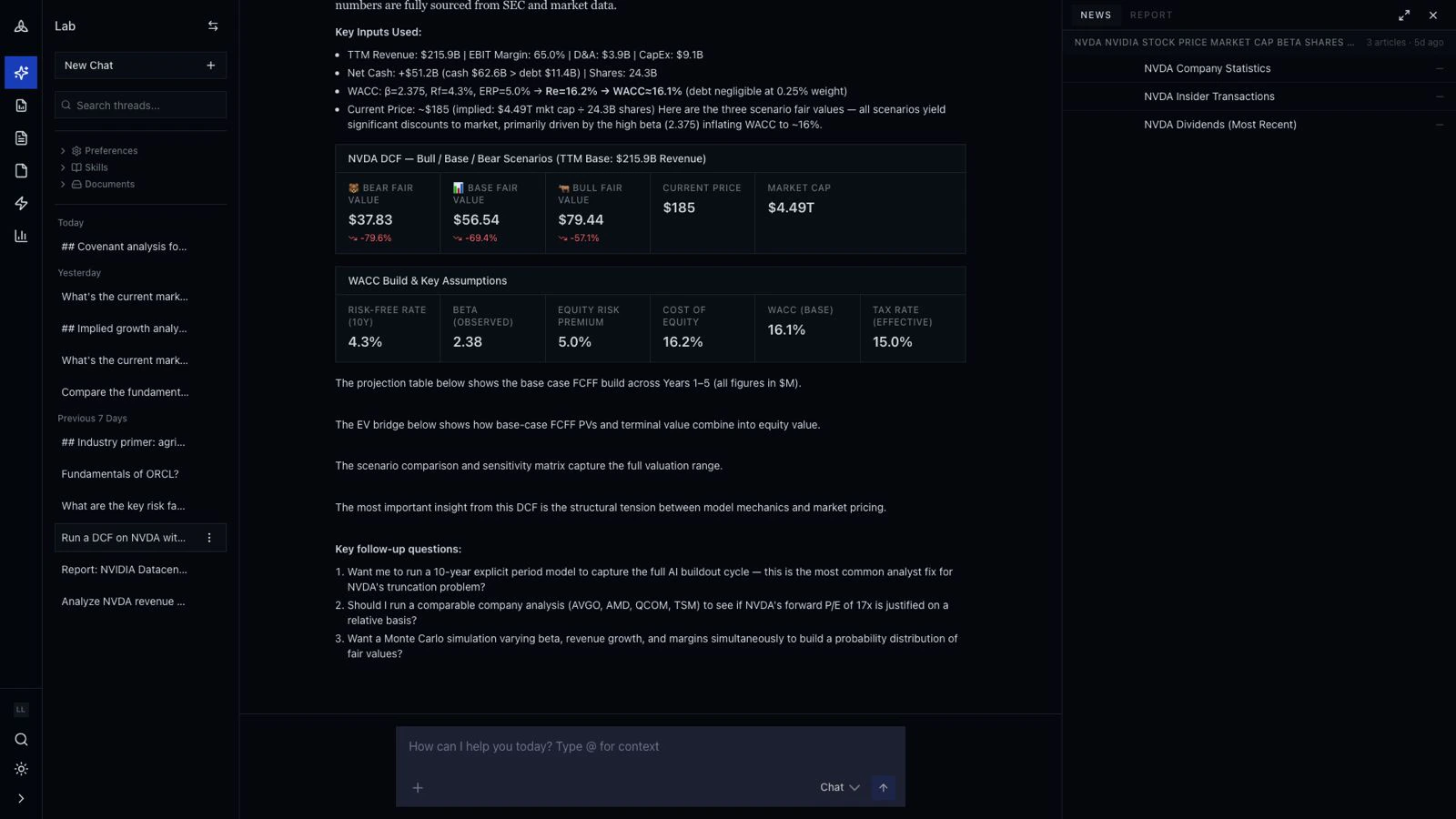
Once the assumptions are committed, Lab streams three cards: **Bear**, **Base**, **Bull**. Each shows the implied fair value, the upside / downside to current market price, and the assumption it's most sensitive to.
## Step 2 — review the clarifying gates
For a DCF, the inputs that swing fair value most are **WACC**, **terminal growth**, and **forward revenue growth**. cf0 builds defaults from market data and consensus, then asks before committing:
* **WACC** — built from current risk-free rate, equity risk premium, and the company's beta (with the build shown alongside).
* **Forward revenue growth** — three-stage default with the option to override per stage.
* **Terminal multiple** — sector median by default; override if your thesis differs.
The model **pauses** at this point. Accept the defaults to keep going, or override and re-run. The output isn't generated until you've signed off on the inputs.
## Step 3 — read the fair-value range
Once the assumptions are committed, Lab streams three cards: **Bear**, **Base**, **Bull**. Each shows the implied fair value, the upside / downside to current market price, and the assumption it's most sensitive to.
 Below the cards: the **WACC build & assumptions** card (auditable), the **revenue projection table** with QoQ and YoY deltas, and a **sensitivity matrix** of fair value across WACC × terminal-growth pairs.
Every number cites the underlying filing or data feed. Click any figure to open the source.
## Step 4 — generate a one-pager for the PM
In the same thread:
> *Generate a one-page DCF brief for the PM. Lead with the Bull / Base / Bear range, include the WACC build, the assumptions table, and the sensitivity matrix. Flag the two assumptions the answer is most sensitive to.*
cf0 reads the conversation and drafts the report. Edit any section inline before exporting the PDF. The charts and tables aren't editable — they reflect the live thread data — but the prose is. See [Reports](/features/reports) for the full editor.
## Step 5 — save the workflow as a Skill
If "run a DCF with our firm's WACC build and ship a one-pager" is recurring, save it as a custom Skill from the [Skills](/features/skills) page. Org admins can share it across the team. Future runs invoke with `/firm-dcf AAPL` — same WACC build, same three-stage schedule, same one-pager template.
## What this used
This example used every part of cf0:
* **SEC + global filings** — NVDA 10-Ks, consensus revenue, current market data feed.
* **Lab** — the surface where the question came in, the WACC build that rendered live, the report draft.
* **Reports** — branded PDF assembly from the Lab thread.
* **Skills** — saved the firm's specific WACC and three-stage schedule for the next run.
Citations trace every number to source. Reports go out in your firm's brand template.
## Next walkthrough
→ [Build an IC memo](/examples/ic-memo)
Below the cards: the **WACC build & assumptions** card (auditable), the **revenue projection table** with QoQ and YoY deltas, and a **sensitivity matrix** of fair value across WACC × terminal-growth pairs.
Every number cites the underlying filing or data feed. Click any figure to open the source.
## Step 4 — generate a one-pager for the PM
In the same thread:
> *Generate a one-page DCF brief for the PM. Lead with the Bull / Base / Bear range, include the WACC build, the assumptions table, and the sensitivity matrix. Flag the two assumptions the answer is most sensitive to.*
cf0 reads the conversation and drafts the report. Edit any section inline before exporting the PDF. The charts and tables aren't editable — they reflect the live thread data — but the prose is. See [Reports](/features/reports) for the full editor.
## Step 5 — save the workflow as a Skill
If "run a DCF with our firm's WACC build and ship a one-pager" is recurring, save it as a custom Skill from the [Skills](/features/skills) page. Org admins can share it across the team. Future runs invoke with `/firm-dcf AAPL` — same WACC build, same three-stage schedule, same one-pager template.
## What this used
This example used every part of cf0:
* **SEC + global filings** — NVDA 10-Ks, consensus revenue, current market data feed.
* **Lab** — the surface where the question came in, the WACC build that rendered live, the report draft.
* **Reports** — branded PDF assembly from the Lab thread.
* **Skills** — saved the firm's specific WACC and three-stage schedule for the next run.
Citations trace every number to source. Reports go out in your firm's brand template.
## Next walkthrough
→ [Build an IC memo](/examples/ic-memo)